Software is sold to customers everywhere, often by small teams, and paid for in more ways than most products: one-time licenses, monthly and annual plans, prepaid credits, seats, and invoices for larger accounts. Many of those customers would rather pay by card. A growing number, particularly developers and buyers outside the processor's home market, would rather pay in stablecoins.
This post covers how a software or SaaS business can take both through 402pay: which tool fits each thing you sell, how to run renewals, how to provision access from a webhook, and what it costs. It's also clear about what 402pay doesn't do, so you can plan around it.
Match the tool to what you sell
402pay has two ways to ask for money: a payment link with a fixed price, and a payment your server creates through the API for an exact amount. Most software products map onto them cleanly:
| A one-time license | A link per edition, or an API payment per order if you add seats or taxes. Issue the key when the payment succeeds. |
|---|---|
| Monthly or annual plans | An API payment for each period, created by your billing job. More below. |
| Prepaid credits | An API payment for whatever amount the customer tops up, credited to their account on success. |
| Enterprise invoices | An API payment with the invoice number as its reference and a longer lifetime, sent with the invoice. |
Both paths open the same checkout and produce the same payment, so you can start with links for a launch and move plans to the API later without changing how customers pay. Our post on links and the API compares them in detail.
Renewals without stored cards
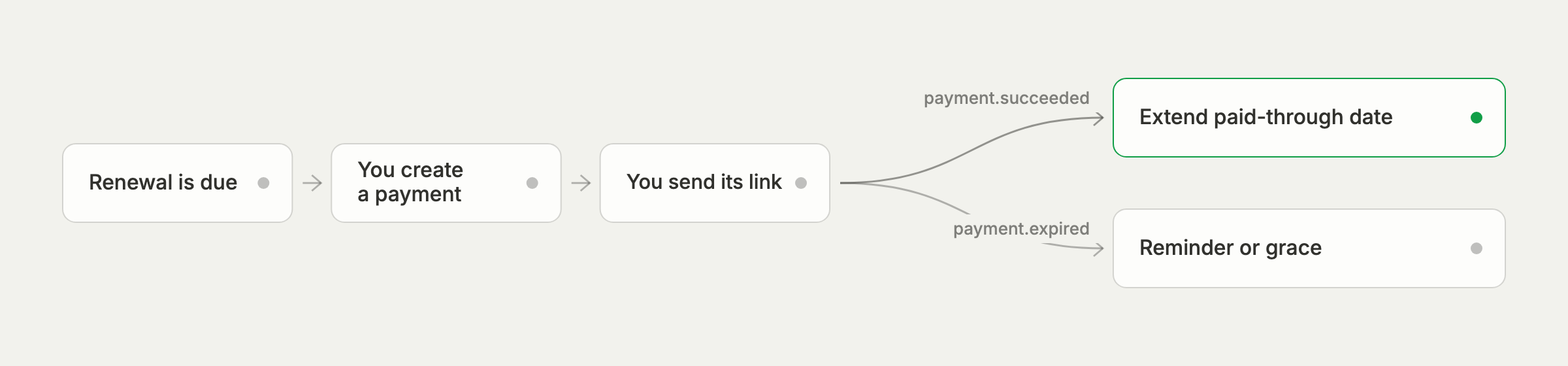
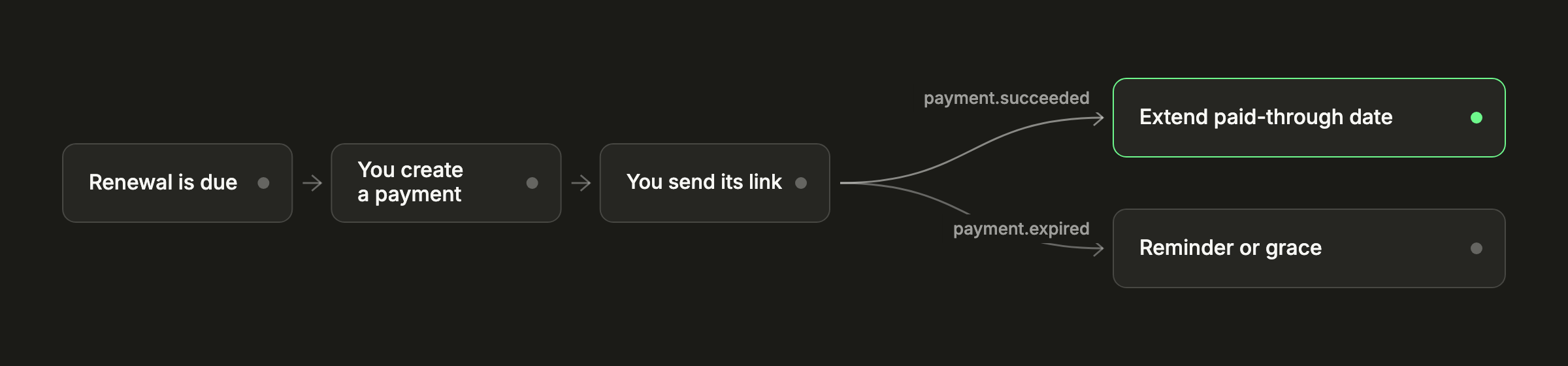
402pay doesn't keep cards on file or charge customers on a schedule, and it has no subscription object. Crypto works this way by nature: nobody can pull funds from a customer's wallet, so every payment is one the customer sends. For a SaaS business, that means your system owns the billing schedule and asks for each payment:
- When a period is due, your billing job creates a payment for that account and period.
- You email the payment's checkout URL to the account's billing contact, or show it in your app.
- When
payment.succeededarrives, you extend the account's paid-through date. - If the payment expires unpaid,
payment.expiredtells you to send a reminder or start your grace process.
curl -X POST "https://dash.402pay.co/api/v1/payments" \ -H "Authorization: Bearer $PAY402_SECRET_KEY" \ -H "Content-Type: application/json" \ -d '{ "amount": "290.00", "currency": "USD", "reference": "acct_5521_2026-11", "description": "Team plan, November 2026", "customer_email": "[email protected]", "metadata": { "account_id": "acct_5521", "plan": "team" }, "expires_at": "2026-11-08T00:00:00Z", "success_url": "https://app.example.com/billing" }'A few fields do the work here. The reference (up to 64 characters) names the account and the period, so if your billing job runs twice, the second request gets the existing payment back instead of creating another. Metadata (up to 20 pairs) carries your own ids into every webhook. And expires_at, anywhere from 15 minutes to 30 days out, keeps the payment open for your grace period.
We don't email your customers
402pay doesn't send customers invoices, reminders, or receipts by email. The renewal email comes from you, in your product's voice, which also means it reaches customers from an address they already recognize. Every paid payment has a hosted receipt you can link to.
Annual plans and prepaid credits suit this model particularly well: one payment covers a long period or a large balance, and there are fewer reminders to send.
Provision on the webhook
After paying, the customer returns to your success URL. Treat that as a place to show a message, not as proof of payment: a customer can close the tab before it loads, and anyone can type a URL. Grant access when your server receives payment.succeeded, which means the funds are final.
Webhooks are signed, so your server can verify each one came from 402pay, and a delivery that doesn't get a successful answer is retried, 8 attempts in all over about 28 hours. Make the handler idempotent: look up the account by the payment's metadata or reference, and extend it once however many times the event arrives. Our post on webhook signatures covers verification.
The redirect is for the customer. The webhook is for your database.
Cards and crypto in one checkout
Customers choose how to pay at checkout, from whatever you've turned on: Visa, Mastercard, American Express, Apple Pay and Google Pay, and the coins and networks you accept. Card payments are converted to crypto before they reach you, so revenue lands in one wallet, in one form, however each customer paid.
The two rails are priced differently, which matters for software's wide range of order sizes:
- Crypto: 1% + 10¢ on stablecoins and 1% + 10¢ on other coins, on each payment that succeeds.
- Cards: 4% + 30¢, in beta.
The fixed part is almost nothing on an annual plan or an enterprise invoice, while the percentage grows with the order, so the gap between the two rails grows with it. Our cost comparison works through it at every order size. If you'd rather customers covered the fee, the API lets you set who pays it on each payment, and the pricing page lists every fee.
Customers, keys, and access
Passing customer_email when you create a payment attaches it to a customer, so each account's payments collect in one place in the dashboard. You can add private notes to a customer, export the list, and block one who shouldn't be able to pay you again.
Give the billing service its own restricted API key. Write on Payments is enough to create payments and read their status; a reporting job needs only Read. No API key can move funds out of the wallet, so even a leaked billing key can't take money.
Where to start
A sensible order for a software business adding 402pay:
- Create a payment link for your most common plan and put it on the pricing page as a second way to pay.
- Add a webhook endpoint that marks accounts as paid on
payment.succeeded. - Move renewals and variable amounts to API payments with a reference per account and period.
- Review the payments that need a decision, such as underpaid crypto transfers, as part of your billing routine.
The quickstart walks through creating a payment and handling its webhook, the software solutions page summarizes the fit, and the integrations page lists the platform plugins on the way, with what works on each platform today.
Common questions
- Not as a stored card that's charged automatically. Your billing system creates a payment for each period and sends the customer its checkout link, and a webhook tells you when it's paid.
- Yes. One hosted checkout offers Visa, Mastercard, American Express, Apple Pay, Google Pay, and crypto, and every payment lands in your wallet as crypto.
- When your server receives the payment.succeeded webhook. The redirect to your success URL is for the customer and isn't proof of payment.
- Give each payment a reference that names the account and period. A repeated request with the same reference, amount, and currency returns the existing payment.
- Up to 30 days. Set expires_at to anything from 15 minutes to 30 days from now; the default is 24 hours.
See what 402pay can do for you.
Discover how 402pay helps your business accept any card and get paid in crypto, straight to a wallet you control.